
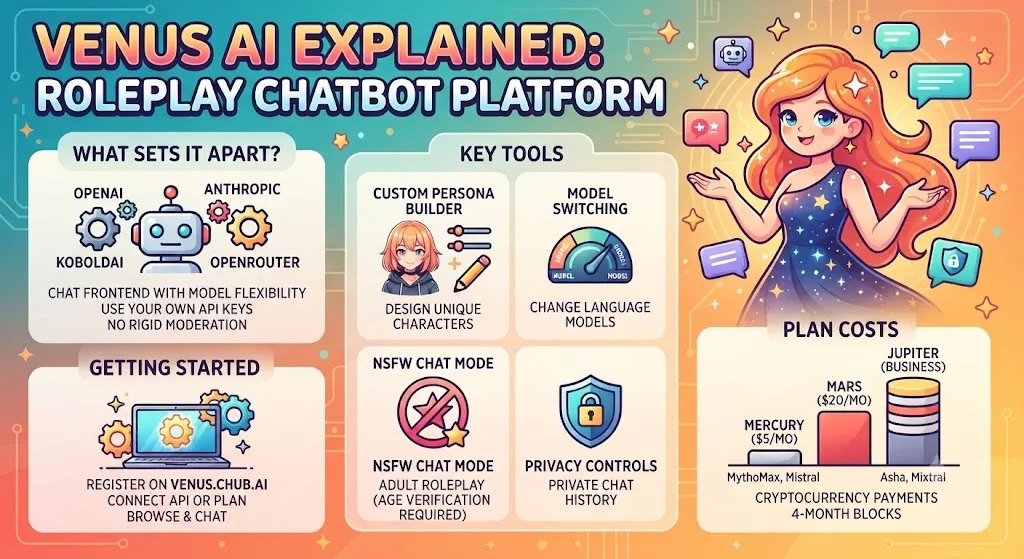
Venus AI is a roleplay chatbot at venus.chub.ai where you chat with custom AI characters powered by external language models through API connections. The platform holds more than 60,000 community-built personas covering anime, gaming, fiction, and original concepts. Both SFW and NSFW chat modes work here. This guide covers what Venus AI does, its plan costs, setup steps, and fixes when things break.
What Sets Venus AI Apart
Venus AI does not run its own model. It works as a chat frontend that connects to OpenAI, Anthropic, KoboldAI, and OpenRouter through API keys. That model flexibility is the main draw for users who want direct control over which engine powers each conversation.
Mainstream options apply strict moderation and lock users into one proprietary model. Venus AI drops that ceiling. Users pick the language model, define character traits, and set the tone. Setup takes more effort than plug-and-play tools like Character AI, but the trade is more freedom over output.
Key Tools Inside Venus AI
Custom Persona Builder
Users design characters from scratch. Pick an avatar, name, backstory, personality traits, and opening message. Import options pull characters from other platforms into your library.
Multi-Language Chats
Conversations work across English, Japanese, Korean, and other supported languages. Output quality depends on the connected model rather than the Venus AI interface itself.
NSFW Chat Mode
Adult chat runs within platform limits. Content involving minors is prohibited outright. Age verification runs before any account receives full access to unrestricted modes.
Model Switching
Move between MythoMax 13B, Asha 70B, Mistral 7B, and Mixtral 8x7B without losing the character setup. External API keys unlock GPT and Claude models too. Similar model routing shows up on Gening AI, though the setup path differs.
Lorebook System
Lorebooks store world details, factions, and character relationships outside the main prompt. Entries activate only when matching keywords appear in conversation. That trims token use and keeps long sessions consistent.
Saved Chat History
Sessions get logged automatically. Auto-summaries condense old chats into short memory blocks the AI loads in future sessions, so continuity survives across weeks of use.
Privacy Controls
Basic account details like usernames get stored. Chat content stays private. API usage logs record only user IDs and usage figures, not conversation data. The connected API provider handles its own data policies.
Venus AI Plan Costs
Two paid tiers are currently active, with a third targeted at business use. Payments process in four-month blocks and both plans accept cryptocurrency.
| Plan | Monthly Cost | Models Included | Best For |
|---|---|---|---|
| Mercury | $5 | MythoMax 13B, Mistral 7B, 8K memory | Casual daily chats |
| Mars | $20 | Asha 70B, Mixtral 8x7B, all Mercury perks | Longer, richer sessions |
| Jupiter | Not yet announced | Built for firms | Business-scale use |
Users who bring their own API key from OpenAI, OpenRouter, or KoboldAI can chat without paying Venus AI directly. That route works well for people already running chat-based AI platforms on Chromebooks where a browser tab is the whole workflow.
How To Get Started With Venus AI
Head to venus.chub.ai and register with an email, username, and strong password. Check your inbox for the verification link. If nothing shows up in a few minutes, check your spam folder.
Once verified, drop a photo and short bio on your profile. From there, either connect an API key or pick a paid plan through the billing page.
Browse the character library or build your own persona. Filter by tags such as anime, gaming, or original characters to find something fast. Adjust chat settings like temperature and context size to shape how the AI replies.
Where Venus AI Fits Into Daily Life
Roleplay And Fiction Drafts
Writers test dialogue by running scenes through custom characters. RPG planners draft settings, factions, and branching plots inside the chat window without leaving the browser.
Study Companion
Students get personalized explanations on science, history, and pop culture as long as the connected model supports the subject. Custom tutor personas back up class content between sessions.
Everyday Productivity
Some users draft emails, outline reports, or brainstorm ideas through conversation with a persona. For lighter daily productivity work in the browser, Use AI on ChromeOS handles general workflows more directly.
What To Do When Venus AI Won’t Load
Check your internet connection first. If your network runs fine, look at the Venus AI social pages for outage announcements. Free-tier users hit queue backlogs during peak hours, so wait times stretch from 30 seconds to several minutes.
Clear browser cache and cookies to fix stale session data. Try a different browser or device if the problem sticks around. Reach out to Venus AI support if none of that resolves the issue. Users who want a built-in fallback can check Chromebook Plus AI features with Gemini for on-device options.
Final Word on Venus AI
Venus AI works for users who want model control and open character customization at a reasonable entry price. The $5 Mercury tier stays cheap enough to test. Third-party feedback outside official channels is thin, so verify session quality before paying for Mars. For a lighter option, see the take on Cici AI.
FAQs
Can I use Venus AI for free?
Venus AI has no free tier for its own models. Users can plug in a free KoboldAI API key or bring keys from OpenAI, Anthropic, or OpenRouter to chat without paying Venus AI directly.
What can I use in place of Venus AI?
Janitor AI runs a similar uncensored roleplay style with no API setup needed for basic chat. Character AI holds the largest character library but applies heavier content filters and locks users into one proprietary model.
Is Venus AI safe?
Venus AI provides private chat mode, standard account protections, and data safeguards. Chat content stays off the servers by default. The main privacy variable depends on which API provider handles the actual model output.
Which models does Venus AI support?
Venus AI supports MythoMax 13B, Asha 70B, Mistral 7B, Mixtral 8x7B, plus OpenAI GPT, Anthropic Claude, and KoboldAI-hosted models through API keys. OpenRouter adds dozens more through a single connection.
Does Venus AI have a mobile app?
No native app exists for iOS or Android. Venus AI runs in any modern browser, including mobile Safari and Chrome. The mobile web interface mirrors desktop functionality with touch controls.