
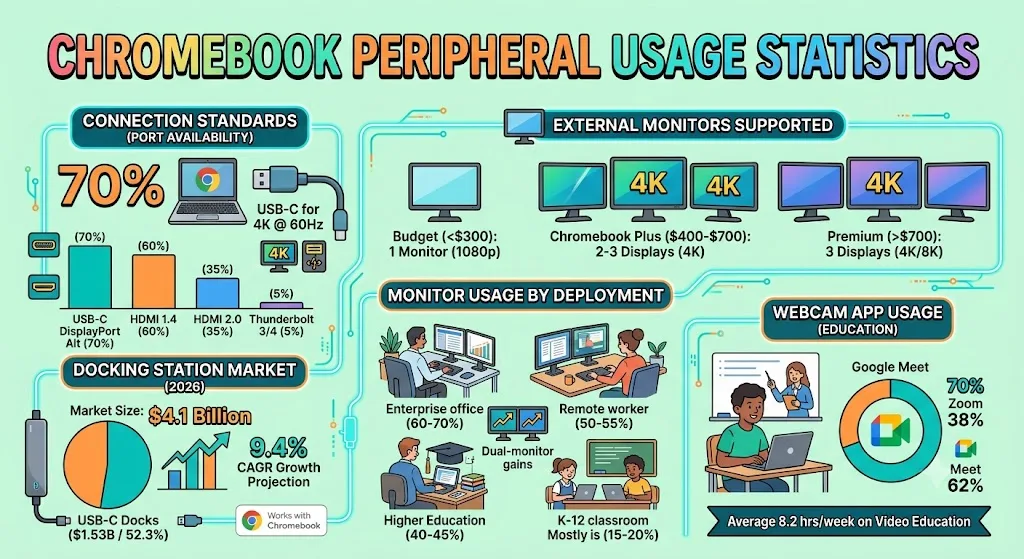
USB-C DisplayPort Alt Mode now appears on 70% of Chromebook models, and over 85% of laptops shipped in 2026 carry a USB-C port. With 22.94 million Chromebooks shipped this year, the accessories plugged into them feed a docking station market worth $4.1 billion. This post covers Chromebook peripheral usage statistics for 2026, from display ports and docks to webcams, monitors, and Bluetooth.
Chromebook Peripheral Usage Statistics 2026 – TL;DR
- USB-C DisplayPort Alt Mode runs on 70% of Chromebook models; Thunderbolt 3/4 appears on just 5%.
- The global docking station market reached $4.1 billion in 2026, with 57% of units supporting USB-C or Thunderbolt 4.
- Chromebooks drive 1 to 3 external monitors; Chromebook Plus models handle up to three 4K displays at once.
- 58% of office employees use multi-monitor setups, and enterprise Chromebook desks reach 60-70% external monitor use.
- Google Meet runs on about 70% of school-issued Chromebooks, making it the most-used webcam app on the platform.
Most peripheral activity on Chromebooks runs through a single USB-C port that carries video, data, and power. Connection standards split sharply by price tier, docking stations bridge the port gap on budget models, and webcams stay active for hours each week in schools. The data below breaks Chromebook peripheral usage down by connection type, device support, market size, deployment setting, and region.
How Do Chromebooks Connect to Peripherals in 2026?
Chromebooks plug into mice, keyboards, drives, and webcams through USB-A and USB-C ports, with USB-C now the primary connector. USB-C DisplayPort Alt Mode reaches 70% of models and outputs 4K at 60Hz. HDMI 1.4 sits on 60% of devices but caps 4K at 30Hz. Thunderbolt 3 or 4 stays rare at 5%, limited to premium Chromebook hardware specifications.
| Connection Type | Chromebook Availability | Max Resolution |
|---|---|---|
| USB-C DisplayPort Alt Mode | 70% of models | 4K at 60Hz |
| HDMI 1.4 | 60% of models | 4K at 30Hz |
| HDMI 2.0 | 35% of models | 4K at 60Hz |
| Thunderbolt 3/4 | 5% of models | 8K at 60Hz |
Source: Google Chromebook Help, Samsung
How Many External Monitors Can a Chromebook Support?
Chromebooks support 1 to 3 external monitors depending on hardware. Budget models under $300 drive a single 1080p display through one USB-C or HDMI port. The Samsung Galaxy Chromebook Plus runs three external 4K displays while keeping its internal screen on. Many users extend their workspace by pairing a Chromebook with an ultrawide monitor.
| Model Category | Max Displays | Max Resolution | Ports |
|---|---|---|---|
| Budget (Under $300) | 1 | 1080p | 1x USB-C or HDMI |
| Mid-Range ($300-$500) | 1-2 | 1440p | 1-2x USB-C + HDMI |
| Chromebook Plus ($400-$700) | 2-3 | 4K | 2x USB-C + HDMI |
| Premium ($700+) | 3 | 4K | Multi USB-C + HDMI + DP |
Source: Google Chromebook Help, Samsung
How Big Is the Chromebook Docking Station Market?
Docking stations let Chromebook users connect monitors and peripherals through one port, which matters most on budget models with limited connectors. The full docking station market reached $4.1 billion in 2026 and is projected to hit $7.8 billion by 2033 at a 9.4% CAGR. The USB-C dock segment reached $1.53 billion and holds 52.3% of the total. The portable monitor market grew to $406.97 million, on track for $2.68 billion by 2035. Certified options include several Works with Chromebook USB-C hubs.
| Metric | 2026 Value | Detail |
|---|---|---|
| Global docking station market | $4.1 billion | 57% support USB-C / Thunderbolt 4 |
| USB-C dock market | $1.53 billion | 52.3% of total dock market |
| Portable monitor market | $406.97 million | 23.4% CAGR through 2035 |
| Wireless docking stations | +30% growth | Fastest-rising dock type |
| Corporate dock revenue share | 37% | Online retail holds 45% |
Source: Coherent Market Insights, 360 Research Reports, Precedence Research
Chromebook Peripheral Usage Statistics by Deployment Type
External monitor attachment varies widely by setting. Enterprise desks lead at 60-70%, where productivity needs outweigh mobility. K-12 classrooms sit at 15-20%, held back by budget and the mobile nature of school devices. Dual-monitor users report productivity gains of up to 47%, which drives higher attachment among remote work deployments.
| Deployment Type | External Monitor Usage | Primary Driver |
|---|---|---|
| K-12 Education | 15-20% | Budget, mobility |
| Higher Education | 40-45% | Research, design work |
| Enterprise | 60-70% | Productivity requirements |
| Remote Workers | 50-55% | Hybrid work setups |
Source: About Chromebooks, Coherent Market Insights
Which Video Platforms Drive Chromebook Webcam Usage?
The webcam is one of the most active peripherals on any Chromebook. Google Meet recorded over 300 million monthly active users and runs on about 70% of school-issued devices. Among students, 62% prefer Google Meet while 38% use Zoom. Standard education models ship with 720p cameras; Chromebook Plus raised the floor to 1080p. More detail sits in the built-in webcam usage data and the Chromebook Plus certification.
| Platform | Software Market Share | Monthly Active Users |
|---|---|---|
| Zoom | 55.91% | 300M+ daily participants |
| Microsoft Teams | 32.29% | 320M monthly |
| Cisco Webex | 7.61% | Not disclosed |
| Google Meet | ~6% | 300M monthly |
Source: ElectroIQ, About Chromebooks
Students spend an average of 8.2 hours per week on video platforms for education. Remote workers join 7.3 video calls per week, hybrid workers 4.1. Mobile devices account for 42% of all video conferencing sessions.
Wireless Chromebook Peripherals and Bluetooth Connectivity
Wireless mice and keyboards connect over Bluetooth, with versions 5.0 to 5.2 common across the current lineup and 5.4 on 2026 flagship Chromebook Plus models. Made for Chromebook accessories such as the CTL wireless keyboard and mouse run Bluetooth 5.2 and last 24 to 29 months on AAA batteries. Wi-Fi 7 is emerging on education models, detailed in the wireless performance data.
| Wireless Standard | Chromebook Availability |
|---|---|
| Wi-Fi 6 / 6E | Standard on most 2024-2026 models |
| Wi-Fi 7 | Acer education models (Jan 2025), MediaTek MT8196 flagships |
| Bluetooth 5.0-5.2 | Common across current lineup |
| Bluetooth 5.4 | 2026 flagship Chromebook Plus |
Source: MediaTek, Acer, Google ChromeOS peripheral documentation
FAQs
How do Chromebooks connect to external peripherals?
Chromebooks connect through USB-A and USB-C ports plus Bluetooth. USB-C is the main connector, carrying video, data, and power. USB-C DisplayPort Alt Mode is on 70% of models and supports 4K output at 60Hz.
How many monitors can a Chromebook support?
Chromebooks support 1 to 3 external monitors depending on the model. Budget devices handle one 1080p display, while Chromebook Plus models drive up to three 4K monitors at once.
How large is the Chromebook docking station market?
The global docking station market reached $4.1 billion in 2026, projected at $7.8 billion by 2033. The USB-C dock segment alone hit $1.53 billion, holding 52.3% of total dock revenue.
What webcam resolution do most Chromebooks have?
Most school Chromebooks ship with 720p webcams. Chromebook Plus models, starting at $349, require 1080p cameras with temporal noise reduction as a minimum standard.
Do wireless mice and keyboards work with Chromebooks?
Yes. Bluetooth mice and keyboards pair over versions 5.0 to 5.4. Made for Chromebook accessories add ChromeOS-specific keys and run 24 to 29 months on AAA batteries.
Sources
https://www.coherentmarketinsights.com/market-insight/docking-station-market-853
https://www.precedenceresearch.com/portable-monitor-market
https://www.360researchreports.com/market-reports/usb-type-c-docks-market-215234
https://developers.google.com/chromeos/peripherals/cc-bluetooth-v2