
Weekly Issue: 2026-22
-
As Kindle gets more restrictive, this Android E-Ink tablet feels refreshingly open

Android flexibility without too much distraction.
-
As Kindle gets more restrictive, this Android E-Ink tablet feels refreshingly open
Android flexibility without too much distraction.
-
The barrier between Google Chat and Microsoft Teams is falling

For years, one of the biggest headaches in corporate communication has been the digital wall separating different workplace platforms.
-
Google Meet makes its Gemini AI assistant way easier to find on the web

Google has been aggressively rolling out Gemini integrations across the entire Workspace suite over the past year, turning standard productivity apps into active, AI-driven collaboration spaces. But as everyone is starting to realize with all these AI features, a powerful agent is only useful if people can actually find it.
-
Fix Chrome Downloads Stuck on “Pending” on Android


A download that just sits on “Pending” and never starts is one of the more frustrating Chrome bugs on Android. It usually comes down to a weak connection, a storage issue, or stale app data. These fixes will get your downloads moving again.
-
Early Stable Update for Desktop

The Stable channel has been updated to 149.0.7827.53/.54 for Windows and Mac as part of our early stable release to a small percentage of users. A full list of changes in this build is available in the log.You can find more details about early Stable releases here.
-
Google Drive’s big document scanner overhaul is finally here — don’t overlook its power

Google Drive finally gets a massive document scanner upgrade, but your phone needs 8GB of RAM to run it.
-
Google Drive’s big document scanner overhaul is finally here — don’t overlook its power
Google Drive finally gets a massive document scanner upgrade, but your phone needs 8GB of RAM to run it.
-
Chrome Beta for Desktop Update
The Beta channel has been updated to 149.0.7827.53 for Windows, Mac and Linux.A partial list of changes is available in the Git log. Interested in switching release channels? Find out how. If you find a new issue, please let us know by filing a bug.
-
Chrome Dev for Android Update
Hi everyone! We’ve just released Chrome Dev 150 (150.0.7863.2) for Android. It’s now available on Google Play.You can see a partial list of the changes in the Git log. For details on new features, check out the Chromium blog, and for details on web platform updates, check here.
-
From petabytes to predictions: Easy BigQuery insights in Google Sheets


Many organizations’ single source of truth is data that resides in BigQuery, Google’s governed, secure and petabyte-scale data platform. However, the “last mile” of ad-hoc analysis, modeling, and reporting often happens where business users are most comfortable: Google Sheets. Bridging this gap usually involves exporting data as CSVs.
-
Unboxing the new Lenovo Chromebook Plus 15: a mix of high-end and mid-range

Every now and then, a device lands in the office that makes us scratch our heads a bit; not because it’s bad, but because the combination of specs is just so confusing.
-
How to Stop Forced Split Screen in Chrome for Android
If you use Google Chrome on an Android tablet or foldable device, a recent update might have introduced a highly disruptive layout change.
-
Scale your web expertise with Chrome DevTools for agents #GoogleIO

Stop letting your coding agent burn through tokens by guessing how to fix your website. Chrome DevTools for agents introduces specialized tools to run performance traces, accessibility checks, and SEO audits. It actually tests for known problems instead of just blindly reading your source code.
-
Why I Ditched Manual Outreach (And What Actually Works Now)

I tracked my time last month. 47 hours on link outreach—hunting down sites, writing personalized emails, sending follow-ups that get ignored. The result? Four links. Link building is one of those necessary evils everyone agrees matters but nobody wants to do.
-
Why PWAs are Winning: The Best Way to Experience High-Stakes Gaming on ChromeOS

There is a moment every ChromeOS user eventually reaches: the realization that everything they need is already in the browser. No app store, no installation wizard, no update prompt appearing at the worst possible moment. Just a URL, and you are in.
-
ChromeOS 134 and the Rise of “Heavy” PWAs: Is Your Chromebook Ready for High-Stakes Web Gaming?
For years, Chromebooks occupied a specific niche: lightweight, affordable, web-first devices built for email, documents, and the occasional YouTube session. Gaming was an afterthought, if it was considered at all.
-
Multi-Tab Mastery: Optimizing ChromeOS for Real-Time Live Stream and Odds Tracking

Anyone who has tried to run a live sports stream alongside multiple odds-tracking tabs, a stats dashboard, and a bet slip simultaneously knows the feeling: the browser starts to stutter, tabs reload unexpectedly, and what should be a fluid, real-time experience becomes a frustrating race against the machine.
-
5 Hidden Chrome Flags That Instantly Optimize Your Chromebook to Play Sweepstakes Casinos for Free Without Frame Drops

Most Chromebook users never touch Chrome flags. That is a mistake. Buried inside chrome://flags is a set of experimental controls that can meaningfully change how your device handles graphics rendering, memory, and network performance – all without spending a cent or installing anything new.
-
How to protect Windows 10 and 11 PCs from ransomware


CryptoLocker. WannaCry. DarkSide. Conti. MedusaLocker. Qilin. The ransomware threat has exploded over the past decade, and it isn’t going away anytime soon; the news brings constant reports of new waves of this pernicious type of malware washing across the world.
-
How to protect Windows 10 and 11 PCs from ransomware
CryptoLocker. WannaCry. DarkSide. Conti. MedusaLocker. Qilin. The ransomware threat has exploded over the past decade, and it isn’t going away anytime soon; the news brings constant reports of new waves of this pernicious type of malware washing across the world.
-
Chrome for Android Update
Hello Everyone! We’ve just released Chrome 149 (149.0.7827.48) for Android to a small percentage of users. It’ll become available on Google Play over the next few days. You can find more details about early Stable releases here.This release includes stability and performance improvements.
-
Chrome Beta for Android Update
Hi everyone! We’ve just released Chrome Beta 149 (149.0.7827.48) for Android. It’s now available on Google Play.You can see a partial list of the changes in the Git log. For details on new features, check out the Chromium blog, and for details on web platform updates, check here.
-
A bizarre Chrome bug is locking some Android tablet users out of their browser
Google is now scrambling to fix the bug.
-
A bizarre Chrome bug is locking some Android tablet users out of their browser
Google is now scrambling to fix the bug.
-
The Chrome browser is getting a big safety upgrade — if you use Windows
Chrome is making it safer to browse the web after logging in.
-
The Chrome browser is getting a big safety upgrade — if you use Windows
Chrome is making it safer to browse the web after logging in.
-
How to Reset Google Password on Any Device
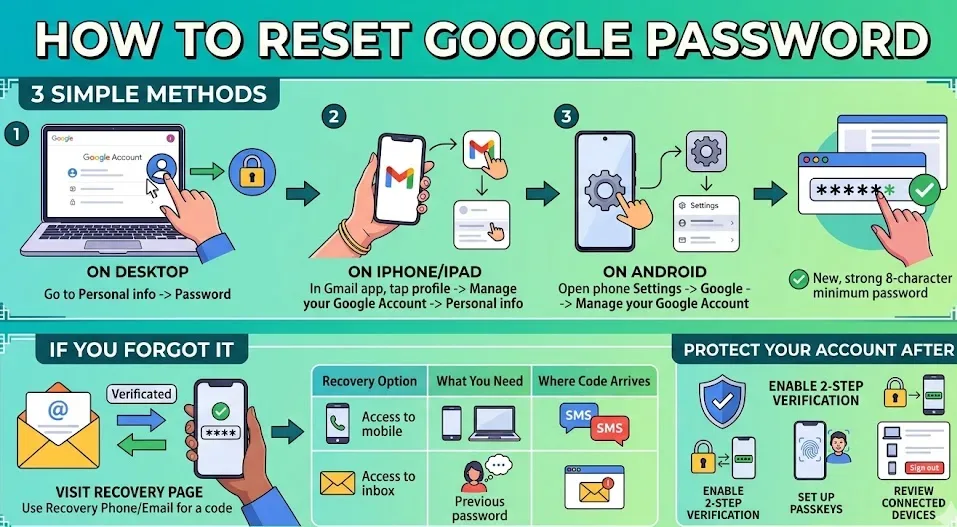
Google accounts hold emails, photos, documents, and much more. With billions of users relying on Gmail and other Google services every day, protecting login credentials is essential.
-
You can now generate custom YouTube video feeds based on specific text prompts
YouTube is officially rolling out a new update that might change how you discover content on the platform. Moving beyond the standard, algorithm-driven recommendations, this new feature allows you to design a personalized content feed dedicated to your specific interests, moods, or favorite topics.
-
MediaTek confirms Dimensity processors will power new Googlebooks, not Kompanio
With the official Googlebook announcement behind us, we finally have a clearer picture of these new AI-powered laptops. We now know which brands will be building the first Googlebooks for the fall launch, but we also got official confirmation that Intel, Qualcomm, and MediaTek will supply the underlying processors.
-
Chrome Enterprise rolls out AI agents and automation to streamline security management

Google LLC today launched new enhancements to Chrome Enterprise, the company’s enterprise version of its Chrome browser, designed to provide greater administrative and security control to information technology teams.
-
Evolving Dataflow to process massive datasets for machine learning
Google created MapReduce more than 20 years ago to solve the scaling problems in data processing that the then young company was running into.
-
The Comprehensive Guide to Fixing ‘STATUS_ACCESS_VIOLATION’ Crashes in Google Chrome (2026 Edition)

Few error screens on the web are as frustrating as Google Chrome’s “Aw, Snap!” crash window. When that crash is accompanied by the specific code STATUS_ACCESS_VIOLATION (often paired with its sister error, STATUS_STACK_BUFFER_OVERRUN).
-
What it actually takes to prep for a #GoogleIO session!
See what it actually takes to prep for a #GoogleIO session, from backstage mic checks to the post-session high-fives. Matthias Rohmer, Thomas Steiner, Una Kravets, and Mark Thomas share an insider look behind this year’s biggest event. Subscribe to Chrome for Developers → https://goo.gle/ChromeDevs #ChromeForDevelopers #chrome #googleio
-
Chrome OS And Web Apps: A New Everyday Experience

There was a time when buying a laptop meant immediately hunting down installation discs or sitting through massive file downloads just to get some work done. ChromeOS completely flipped that script.
Welcome to the ChromeOSphere
Your one-stop hub for all things Chrome OS and Chrome browser. Our mission is simple: to keep you connected with the pulse of this ever-evolving digital realm. From the latest updates on Chrome, ChromeOSphere brings together the diverse voices of the Chrome world.