
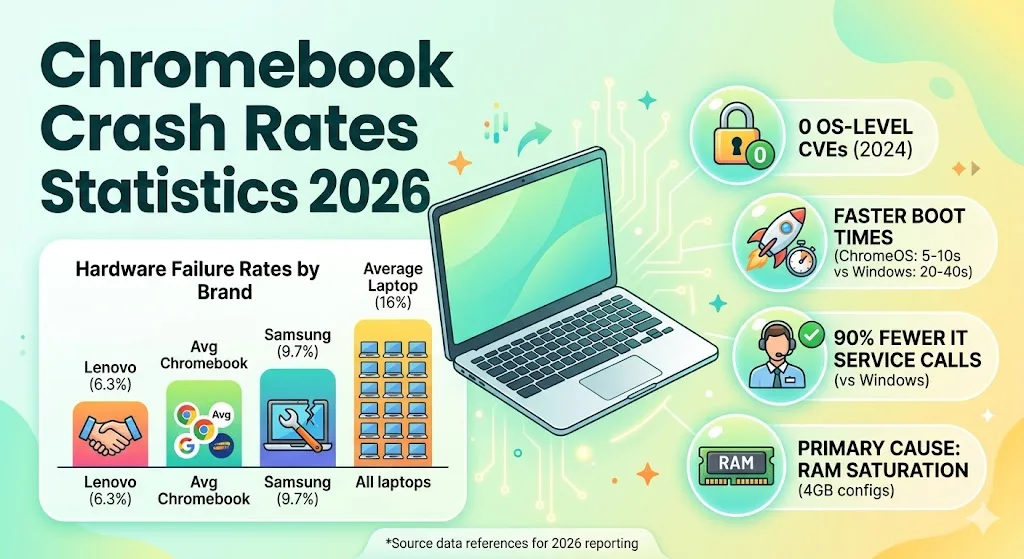
ChromeOS recorded zero OS-layer CVEs in all of 2024, and an Intel field study found it generates 90% fewer hardware-related IT service calls than Windows. This article covers verified Chromebook crash rate and failure statistics for 2026, including brand-level hardware failure rates, memory pressure thresholds, OS security metrics, and the 2022 market shipment collapse that is often mislabeled as a product failure.
Chromebook Crash Rate Statistics: Key Numbers for 2026
- Lenovo Chromebooks record a 6.3% hardware failure rate over five years, the lowest of any tracked brand.
- ChromeOS produced zero OS-level CVEs in 2024, while Chrome browser CVEs reached 205 in 2025.
- ChromeOS devices generate 90% fewer hardware-related IT service calls than Windows, per Intel field research.
- Chrome 140 uses approximately 1.4 GB of RAM at 10 active tabs, down 22% from Chrome 135’s 1.8 GB.
- 38 million K-12 Chromebooks were deployed globally as of 2024, the large majority on 4 GB configurations.
Chromebook Hardware Failure and Crash Rates by Brand
Brand-level reliability data from About Chromebooks shows a 3.4 percentage point spread across tracked manufacturers over five years. Lenovo leads at 6.3%, while Samsung records the highest rate at 9.7%. Both figures compare well against the broader laptop market: Consumer Reports analyzed 75,923 portable computers purchased between 2019 and 2025 and found 16% had broken or stopped working within three years.
Common hardware failure points across all brands are keyboard malfunctions, screen damage, battery degradation, and hinge breakage — not OS crashes. According to Chromebook upgrade vs. replacement trends, the PIRG Education Fund’s repairability index scores Chromebooks at 3.3 out of 20, versus 9 out of 20 for standard laptops, meaning failures in the field typically produce full device replacement rather than repair.
| Brand / Segment | 5-Year Hardware Failure Rate | Average Lifespan |
|---|---|---|
| Lenovo | 6.3% (lowest) | 8.2 years |
| Samsung | 9.7% (highest) | 6.8 years |
| All Chromebook brands (avg) | — | 7.6 years |
| Consumer-use Chromebooks | — | 6.9 years |
| Education deployments | — | 8.1 years |
| Government deployments | — | 8.3 years (longest) |
| All laptops (Consumer Reports) | 16% within 3 years | — |
Source: About Chromebooks Average Chromebook Lifespan Statistics 2026; Consumer Reports (75,923 devices, surveys 2023–2025)
The average Chromebook lifespan data for 2026 shows a 1.4-year gap between consumer (6.9 years) and government (8.3 years) deployments. That difference reflects centralized IT management and lower physical wear in government fleets, not different hardware. All brands’ failure rates hold well below the 16% three-year benchmark Consumer Reports recorded across the broader laptop category.
ChromeOS Crash Rate vs Windows: Security and Stability Metrics
CVE counts measure documented security failure pathways. ChromeOS recorded zero OS-level CVEs in 2024 — the OS layer produced no documented exploitable vulnerabilities that year. The 205 Chrome browser CVEs published in 2025 reflect the browser’s attack surface, not the underlying OS, and affect Chrome users on Windows and macOS equally.
The ChromeOS RAM usage comparison shows the OS idles at 1.0–1.5 GB versus Windows 11’s 2.5–3.2 GB — a structural resource efficiency advantage that directly limits the background-service conflicts responsible for most desktop OS hangs.
| Metric | Figure | Period |
|---|---|---|
| ChromeOS OS-level CVEs | 0 | Full-year 2024 |
| Chrome browser CVEs | 205 | Full-year 2025 |
| Chrome zero-days actively exploited | At least 8 | 2025 |
| Hardware IT service calls (ChromeOS vs Windows) | 90% fewer on ChromeOS | Intel field study |
| ChromeOS idle RAM | ~1.0–1.5 GB | 2024–2025 |
| Windows 11 idle RAM | 2.5–3.2 GB | 2024–2025 |
| ChromeOS boot time | 5–10 seconds | 2024–2025 |
| Windows boot time | 20–40 seconds | 2024–2025 |
Source: Stack.Watch via About Chromebooks; BleepingComputer via About Chromebooks; Intel via Mordor Intelligence; About Chromebooks / RTINGS hardware testing
Intel’s 90% service call reduction encompasses the full range of IT escalations — crashes, freezes, hardware failures, and update-related instability — not only security events. ChromeOS runs fewer background system services competing for CPU time, which removes the resource conflicts that produce hangs under load on more complex OS configurations. You can verify your device’s current resource profile using the steps outlined at how to check Chromebook specs.
RAM and Memory Pressure: The Primary Chromebook Crash Trigger
OS freezes and tab crashes on Chromebooks trace most directly to memory saturation. At the average session of 11.4 open tabs, Chrome 140 on a 4 GB Chromebook competes for 1–2.5 GB of headroom after the OS baseline of 1.0–1.5 GB is subtracted. Inactive background tabs consume 200–500 MB each before Chrome’s Memory Saver discards them — on a 4 GB device running 11+ tabs, saturation is deterministic.
This is a hardware-specification problem, not an OS bug. As the 4 GB vs 8 GB Chromebook analysis documents, the Android container alone consumes memory at boot if Google Play is enabled, narrowing available headroom further. The Chromebook Plus program’s 8 GB minimum addresses the threshold, but 38 million K-12 units remain deployed below it.
| Metric | Figure |
|---|---|
| Chrome 140 RAM at 10 active tabs | ~1.4 GB |
| Chrome 135 RAM at 10 active tabs | ~1.8 GB (+22% vs Chrome 140) |
| Chrome RAM at 20 active tabs | ~1.9 GB |
| Average open tabs per Chrome session (2025–2026) | 11.4 |
| Memory Saver inactive tab reduction | Up to 80% |
| Memory Saver tab revisit rate within 24 hours | ~60% |
| Most common K-12 Chromebook RAM configuration | 4 GB (majority of 38M deployed) |
| Chromebook Plus minimum RAM standard | 8 GB |
Source: About Chromebooks; SuperchargeBrowser; XDA Developers; Google internal data via About Chromebooks; Android Police
ChromeOS deploys two countermeasures: zRAM compression, active since ChromeOS version 27, and Memory Saver, which reduces inactive tab memory by up to 80%. The Chrome tab recovery rate data shows users return to suspended tabs within 24 hours about 60% of the time, confirming the feature operates at capacity in normal sessions — not just as an emergency measure.
Chromebook Market Shipments: Understanding the 2022 Sales Crash
The word “crash” appears in Chromebook statistics most prominently in a market context: the 2022 shipment collapse. Global Chromebook shipments fell 62–67% year-over-year in Q1 2022, one of the steepest single-quarter declines in recent consumer electronics history. Schools that bulk-purchased devices in 2020–2021 had no replacement demand for years afterward.
This shipment drop was a demand saturation event, not a product quality failure. The devices performing those 90% fewer IT service calls and achieving 7.6-year average lifespans were the same hardware units shipped in that collapsed market. For buyers today, the current Chromebook buying guide covers which models and specs align with different workloads given these RAM thresholds.
| Period | Shipments / YoY Change | Source |
|---|---|---|
| Full-year 2021 | 36.9 million units | Statista |
| Q1 2022 YoY change | -62% to -67% | Gartner / Canalys |
| Full-year 2022 | ~20 million units (-48% full year) | IDC via Softpedia |
| Full-year 2024 | 17.5 million units | DigiTimes |
| H1 2025 | 11 million units (+10.6% YoY) | About Chromebooks via IDC |
Source: Gartner via The Register; Canalys via GSMArena; IDC via Softpedia; Statista; DigiTimes; About Chromebooks via IDC
H1 2025 returned to growth at +10.6% year-over-year. For context on long-term device economics, student Chromebook recommendations show how the 83% of active Chromebooks now covered by the 10-year auto-update policy changes the total cost calculation considerably relative to the 2022 market conditions.
FAQs
Do Chromebooks crash more than Windows laptops?
No. An Intel field study found ChromeOS generates 90% fewer hardware-related IT service calls than Windows. ChromeOS also recorded zero OS-level CVEs in 2024, meaning no documented OS-layer failure pathways that year.
What causes most Chromebook freezes and crashes?
Memory saturation on 4 GB devices under modern web workloads is the primary documented cause. Running 10+ browser tabs on a 4 GB Chromebook can exhaust available RAM once the OS baseline (1.0–1.5 GB) is accounted for.
Which Chromebook brand has the lowest hardware failure rate?
Lenovo records a 6.3% failure rate over five years, the lowest among tracked brands. Samsung is highest at 9.7%. Both are well below Consumer Reports’ 16% three-year breakdown rate recorded across all laptop brands.
What is the average Chromebook lifespan in 2026?
The cross-segment average is 7.6 years in 2026. Government deployments average 8.3 years; consumer-grade devices average 6.9 years. Google’s 10-year auto-update policy now covers 83% of active Chromebooks.
Was the 2022 Chromebook crash a product reliability issue?
No. The Q1 2022 shipment decline of 62–67% was demand saturation following pandemic-era bulk school purchases. Device failure rates during the same period held at 6–10% over five years across all brands.
Sources