
@import url(‘https://fonts.googleapis.com/css2?family=Inter:wght@400;500;600&display=swap’);
.cbg-article .meta{text-align:center;color:#555;margin-bottom:14px;font-size:15px;}
.cbg-article a{color:#1a4fbf;text-decoration:none;border-bottom:1px solid #d6def0;}
.cbg-article a:hover{border-bottom-color:#1a4fbf;}
.cbg-article details{border-bottom:1px solid #e5e5e5;padding:14px 0;}
.cbg-article details:first-of-type{border-top:1px solid #e5e5e5;}
.cbg-article summary{cursor:pointer;font-weight:500;padding:6px 0;list-style:none;font-size:17px;position:relative;padding-right:28px;}
.cbg-article summary::-webkit-details-marker{display:none;}
.cbg-article summary::after{content:’+’;position:absolute;right:0;top:6px;font-size:22px;color:#555;}
.cbg-article details[open] summary::after{content:’−’;}
.cbg-article details p{padding-top:10px;margin-bottom:0;color:#333;}
.cbg-article ul,.cbg-article ol{margin:0 0 16px;padding-left:22px;}
.cbg-article li{margin-bottom:7px;}
.cbg-chart{position:relative;height:330px;margin:0 0 26px;}
@media (max-width:600px){.cbg-article{font-size:16px;padding:16px;}.cbg-article h2{font-size:24px;}.cbg-chart{height:300px;}}
A new Chromebook opens every link in Google Chrome. ChromeOS now allows a different default, but only when that browser comes from the Play Store.
The steps below cover the setting itself, the browsers that qualify, the links that stay with Chrome, and what to check when the option refuses to show up.
Before You Change the Default Browser on a Chromebook
ChromeOS treats Chrome as part of the operating system rather than a removable app. That single fact explains most of the limits.
- Only Android browsers installed from the Play Store appear in the list
- Linux browsers stay inside their container and never register as a system default
- Chrome cannot be uninstalled
- School and work devices often have the setting locked by an administrator
Almost every complaint about a missing option traces back to one of those four points. If you are still deciding what to install, the wider set of browser options that run on ChromeOS is worth a look first.
Which Browsers Can Be Set as Default on a Chromebook?
Firefox, Microsoft Edge, Opera, Brave, DuckDuckGo and Vivaldi all ship Android builds that ChromeOS accepts. Install any of them and the name appears as a choice.
Chrome held about 65% of the worldwide browser market across all devices in March 2026, according to StatCounter. Safari followed near 18%, Edge around 5% and Firefox near 2.8%. More context sits in the Google Chrome usage figures.
Android versions behave differently from their desktop siblings. Some open in a phone-sized window until you resize them, a quirk shared by plenty of Android apps built for the larger ChromeOS screen.
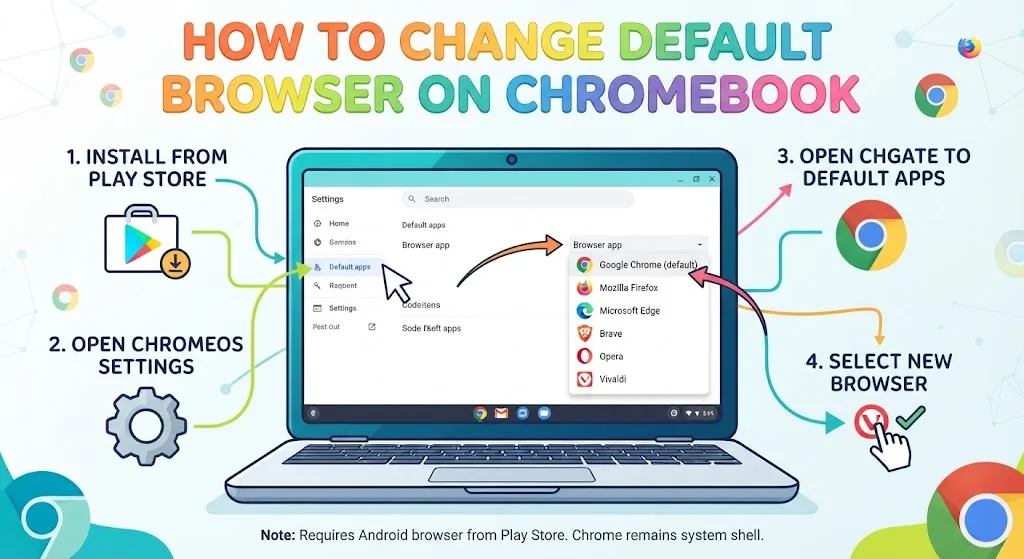
1. Install an Android Browser From the Play Store
- Open the Play Store from the launcher
- Search for the browser you want
- Select Install and wait for it to finish
- Open the browser once so ChromeOS registers it
That last step matters. A browser that has never been launched sometimes stays out of the default list. Mozilla users can follow the shortcut to install Firefox on a Chromebook in about two minutes.
2. Open ChromeOS Settings
Select the time in the bottom-right corner, then the gear icon.
Settings also opens from the launcher if you search for it by name.
3. Open Apps, Then Default Apps
Pick Apps in the left panel, choose Default apps, then select Browser app. ChromeOS lists every installed Android browser there, Chrome included.
On older builds the same control sits deeper: Apps, then Google Play Store, then Manage Android preferences, then Apps, then Default apps, then Browser app.
4. Change the Default Browser on Chromebook
Select the browser you want and close the window. The change applies straight away.
Links from Gmail, Docs, Android apps and the Files app now open in your pick instead of Chrome.
How to Confirm the Default Browser Changed
Click a link in an email or an Android app. If it loads in the new browser, the switch worked.
Some apps ask whether to use Always or Just once. Always writes the rule permanently, Just once tests it without committing.
What Still Opens in Chrome After the Switch
A few jobs stay with Chrome no matter what you select. System pages, Settings links, parts of the ChromeOS shell and some Google service prompts all load there.
Chrome runs more than 98% of Chromebook web traffic, per DigitalApplied data citing StatCounter. The full browser usage data for Chromebooks shows how rare the alternatives are.
No Default Browser Option on Your Chromebook? Try This
- Update ChromeOS, then reopen Settings
- Confirm the browser came from the Play Store and not the Linux terminal
- Restart the Chromebook so the shell reloads the app list
- Check whether the device is managed by a school or employer
The Linux route trips up plenty of people. Linux apps run in a separate container, so a Debian build of Firefox works fine as a program yet stays invisible to Default apps. The same applies when installing apps outside the Play Store.
How to Set Chrome as the Default Browser Again
Go back to Settings, Apps, Default apps, Browser app, and select Google Chrome. The rule reverts instantly.
Many people switch back within a week. Android builds handle desktop sites awkwardly and skip Chrome extensions, which is why some users stay on Chrome and lean on tools that sharpen everyday browsing instead.
FAQs
Can you change the default browser on a Chromebook?
Yes. Install an Android browser from the Play Store, then open Settings, Apps, Default apps, Browser app and pick it. Linux browsers cannot be set as the ChromeOS default.
Why is the Browser app option missing on my Chromebook?
The option appears only when a second Android browser is installed. A missing entry usually points to an outdated ChromeOS build, a Linux-only browser, or an administrator lock on a managed device.
Can you remove Google Chrome from a Chromebook?
No. Chrome is the ChromeOS interface, not a removable app. Setting another browser as default stops it opening most links, but system pages still load in Chrome.
Does the Linux version of Firefox work as a default browser?
No. Linux builds run inside a container and never appear under Default apps. Only the Play Store version of Firefox can act as the Chromebook default browser.
Does changing the default browser slow down a Chromebook?
No. The setting only routes links. Chrome keeps running as the system shell either way, so memory use depends on open tabs rather than which browser handles those links.
(function(){
function draw(){
if(!window.Chart){setTimeout(draw,150);return;}
Chart.defaults.font.family=”‘Inter’,-apple-system,BlinkMacSystemFont,’Segoe UI’,Helvetica,Arial,sans-serif”;
Chart.defaults.color=’#4a4a4a’;
var a=document.getElementById(‘cbgBrowserShare’);
if(a&&!a.dataset.done){
a.dataset.done=’1′;
new Chart(a.getContext(‘2d’),{
type:’bar’,
data:{
labels:[‘Google Chrome’,’Apple Safari’,’Microsoft Edge’,’Mozilla Firefox’,’Opera’,’Samsung Internet’],
datasets:[{label:’Share of global browser market (%)’,data:[65,18,5,2.8,2,2],backgroundColor:[‘#1a4fbf’,’#3a72c9′,’#5b8fd4′,’#7aa9df’,’#9dc0e8′,’#bcd4f0′],borderWidth:0,borderRadius:3}]
},
options:{
indexAxis:’y’,
responsive:true,
maintainAspectRatio:false,
plugins:{
legend:{display:false},
title:{display:true,text:’Global browser market share, all devices, March 2026′,font:{size:14,weight:’600′},color:’#1a1a1a’,padding:{bottom:14}},
tooltip:{callbacks:{label:function(c){return c.parsed.x+’%’;}}}
},
scales:{
x:{beginAtZero:true,max:70,grid:{color:’#eeeeee’},ticks:{callback:function(v){return v+’%’;}},title:{display:true,text:’Share of browser market (%)’}},
y:{grid:{display:false}}
}
}
});
}
var b=document.getElementById(‘cbgChromebookShare’);
if(b&&!b.dataset.done){
b.dataset.done=’1′;
new Chart(b.getContext(‘2d’),{
type:’doughnut’,
data:{
labels:[‘Google Chrome’,’All other browsers’],
datasets:[{data:[98,2],backgroundColor:[‘#1a4fbf’,’#c9d4e6′],borderColor:’#ffffff’,borderWidth:2}]
},
options:{
responsive:true,
maintainAspectRatio:false,
cutout:’58%’,
plugins:{
legend:{position:’bottom’,labels:{boxWidth:12,padding:16}},
title:{display:true,text:’Chromebook web traffic by browser, 2026′,font:{size:14,weight:’600′},color:’#1a1a1a’,padding:{bottom:14}},
tooltip:{callbacks:{label:function(c){return c.label+’: ‘+c.parsed+’%’;}}}
}
}
});
}
}
if(document.readyState!==’loading’){draw();}else{document.addEventListener(‘DOMContentLoaded’,draw);}
})();